Suno AI
AI Music Generation for Everyone
From text to finished song in seconds. No prior knowledge required � simply describe what you want to hear, and Suno creates the track.
🚀 Go to Suno AI →The Suno Interface
Generate music with AI this easily � the 4 steps at a glance
Describe in words what music you want
Choose genre: Rock, Pop, Electronic, Jazz...
Suno creates 2 versions � pick the best one
Save as MP3 or share directly
Suno Studio v1.2
The first web-based AI audio workstation � professional DAW features meet AI generation.
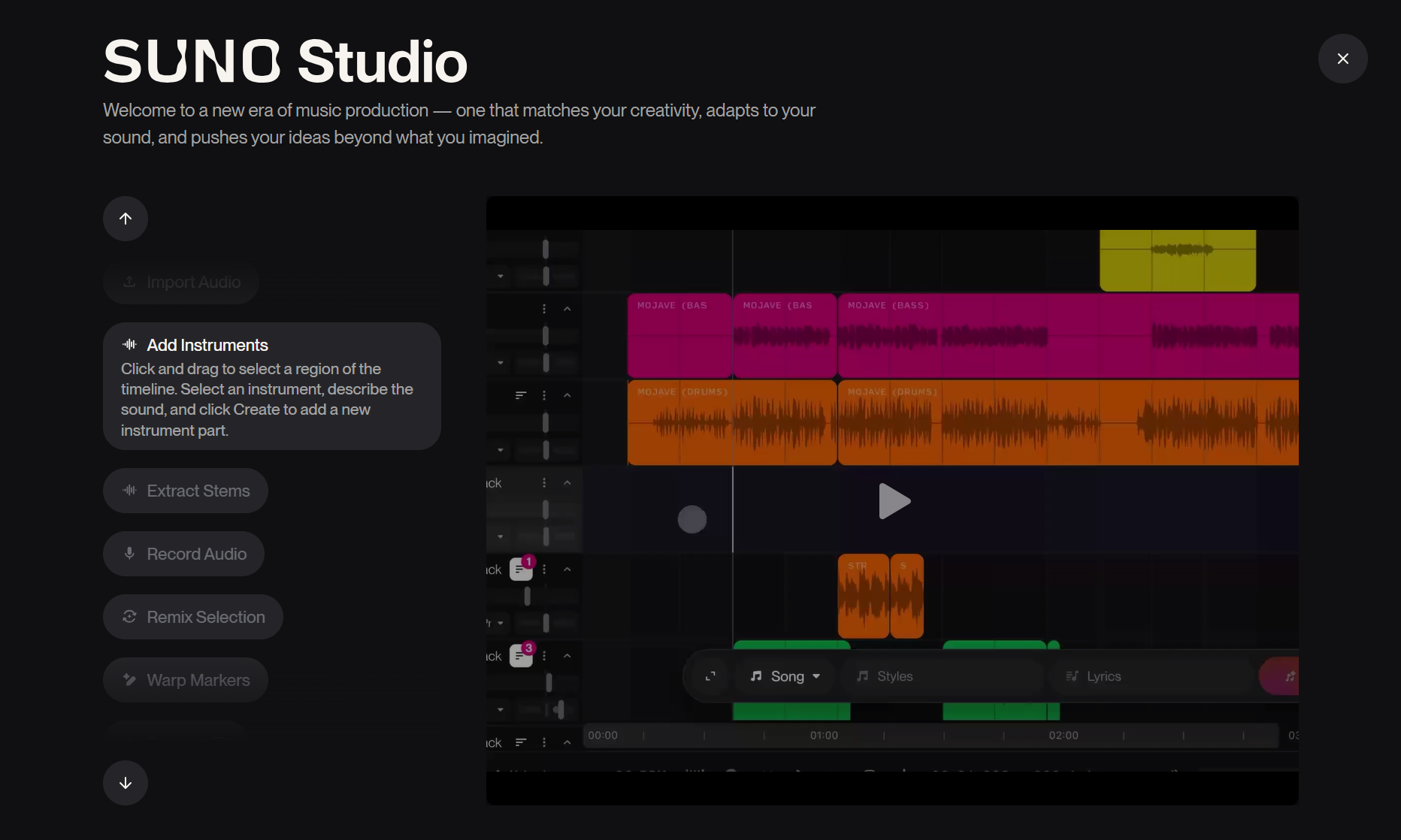
Suno Studio Interface � Multitrack editor with AI-powered editing features
Multitrack Editor
Edit songs like in a professional DAW � cut, arrange and optimize your tracks.
Stem Separation
Extract up to 12 individual tracks (vocals, drums, bass, melody) as WAV files.
MIDI Export
Convert generated melodies to MIDI for further processing in Ableton, Logic or FL Studio.
Add Vocals
Add vocals to existing instrumental tracks � perfect for karaoke or remixes.
Add Instrumentals
Upload your vocal recordings and generate matching instrumentation via AI.
Inspire
Get song suggestions based on your playlists and music taste.
🤔 Who is Suno Studio for?
Suno Studio is aimed at professional musicians, producers and content creators who want maximum control over their AI-generated music. It requires a Premier Plan (from $30/month).
About Suno AI
What is Suno?
Suno AI is an AI-powered music generation tool that creates complete songs from text descriptions. You enter a prompt � style, mood, instruments � and Suno generates a full track with vocals, instruments, and arrangement within seconds.
How does it work?
Enter Prompt
Describe the desired song: genre, mood, instruments, tempo
AI Generates
Suno analyzes your prompt and creates two song variations
Listen & Adjust
Select the best version, extend the song, or regenerate
Download
Download the finished song as MP3 or WAV
Pricing Model
- 50 credits per day
- ~10 songs daily
- Non-commercial use
- Shared queue
- MP3 download
- 2,500 credits per month
- ~500 songs monthly
- Commercial use
- Priority queue
- WAV & MP3 download
- Song extension
- 10,000 credits per month
- ~2,000 songs monthly
- Full commercial rights
- Highest priority
- All download formats
- API access
💡 Tip for Beginners
Start with the free version to try out Suno. With 50 credits daily, you can create about 10 songs � perfect for learning and experimenting.
Sign Up & Registration
Signing up for Suno is simple:
- Visit suno.ai
- Click "Sign Up" or sign in with Google/Microsoft/Discord
- Confirm your email address
- Start immediately with daily free credits
Features
Text-to-Music
Simply enter a description � Suno transforms text into complete songs with vocals and instruments.
Various Genres
From pop to rock to jazz, classical, EDM, hip-hop and more. Over 100 styles supported.
Custom Mode
Full control over lyrics, style, and title. Write your own lyrics or let the AI create everything.
Instrumental Option
Create songs without vocals � perfect for background music, podcast intros, or soundtracks.
Song Extension
Extend your tracks from 2 minutes to 4 minutes or more � seamlessly and harmoniously.
Download Options
Export as MP3 (Free) or WAV in studio quality (Pro/Premier) for professional processing.
Prompting Guide
How to Write Good Prompts
A good Suno prompt is precise and structured. The more accurately you describe what you want, the better the result.
🎯 The Prompt Structure
The ideal structure for Suno prompts:
[Style] � Genre, subgenre, musical direction
[Mood] � Emotion, atmosphere, energy level
[Instruments] � Main instruments, special features
[Tempo/BPM] � Speed (optional)
Example Prompts
"Upbeat electronic dance music, energetic, synthesizer, 128 BPM"
"Lo-fi hip hop, relaxing, piano and rain sounds, study beats, chill atmosphere"
"Epic orchestral trailer music, dramatic, strings and brass, cinematic, powerful"
"Acoustic pop ballad, emotional, acoustic guitar and piano, heartfelt vocals, mid-tempo"
The Tags System
Suno understands certain tags particularly well. Use these tags for more precise results:
❌ To Avoid
- Too vague descriptions like "good music"
- Contradictory styles ("aggressive jazz ballad")
- Copying artist names (copyright!)
- Prompts over 200 characters
Workflow Tutorials
Create Your First Song
Choose Simple Mode
Simple Mode is perfect for getting started. Enter your prompt in the text field.
Activate Instrumental (optional)
Check "Instrumental" if you don't want vocals.
Click Create
Click the Create button. Suno generates two variations � about 30-60 seconds wait time.
Select & Save
Listen to both versions. Click the heart to save a song.
Extend a Song
Extension only works with Pro subscription:
- Click on the song you want to extend
- Select "Extend" from the menu
- Describe how the song should continue (or use the same prompt)
- Suno seamlessly adds more sections
Make a Complete Song from MP3
Have a short clip you want to extend?
- Upload your MP3 to Suno
- Describe the desired style for the extension
- Suno analyzes the clip and generates matching continuations
- Select the best variation and combine it with the original
? Best Practices
- Always start with reference songs from Suno to understand the style
- Save good prompts as templates for later
- Experiment with Custom Mode for your own lyrics
- Use the community gallery for inspiration
AI Ethics & Rights
Copyright with AI Music
The legal situation with AI-generated music is complex and constantly evolving:
- Free version: Songs are intended for personal use
- Pro/Premier: Commercial use is allowed (check current T&Cs)
- You own the rights to your prompts, not necessarily to the AI output
- Different regulations apply in different countries
Commercial Use
With a Pro or Premier subscription, you may use Suno songs commercially:
- Monetize YouTube videos
- Use podcast music
- Use in your own projects
- Publish on streaming platforms (with restrictions)
⚠️ Important
Read the current Terms of Service from Suno carefully. Rights can change. For commercial projects, legal advice is recommended.
Responsible Use
- Respect the work of human musicians
- Be transparent about AI-generated content
- Use Suno as a tool, not a replacement for creativity
- Don't clone real artists or their voices
- Watch for sensitive content in lyrics
Suno Alternatives
Suno isn't the only AI music tool. Here are alternatives for different use cases:
🤔 Which Tool is Right for You?
Suno: Best all-around solution for complete songs
Udio: Highest vocal quality
AIVA: Classical/film music
Soundraw: Content creation & YouTube
Boomy: Quick beats for beginners